
Table of Contents
- I. Safety and Installation
- Q: What is the main warning regarding internal servicing of the STR Preamplifier?
- Q: What precautions should be taken regarding the placement of the unit?
- Q: Does the unit fully disconnect from AC power when turned off?
- Q: What should I do if the power cord or plug is damaged, or if the unit is dropped or exposed to liquid?
- II. Connections and Compatibility
- Q: What digital inputs are available and what formats do they support?
- Q: What connectivity does the USB DAC input offer?
- Q: Do I need drivers to use the USB DAC input with my computer?
- Q: How do I connect a turntable to the STR Preamplifier?
- Q: What is the benefit of using Balanced XLR connections for analog sources?
- III. Setup and Operation
- IV. Anthem Room Correction (ARC)
- Q: What is the primary function of ARC?
- Q: What is the typical effect of a room on frequency response before correction?
- Q: Why doesn’t ARC flatten the bass completely?
- Q: How many measurement positions are required for ARC?
- Q: What is the default and recommended maximum equalization frequency?
- Q: Can ARC compensate for improper speaker placement?
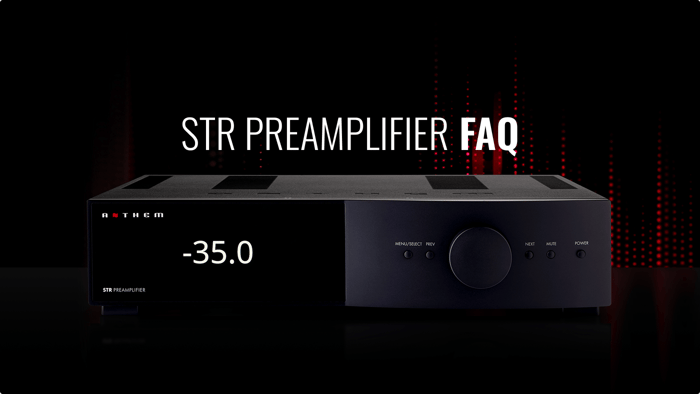
Curious about how to get the most from your Anthem STR Preamplifier? Our Anthem STR Pre-Amplifier FAQ section provides clear, expert answers to common questions about setup, connections, analog and digital sources, firmware updates, and Anthem Room Correction (ARC). Whether you’re integrating a turntable, optimizing a home theater, configuring HT Bypass, or fine-tuning your system with ARC, these answers are designed to help you unlock the full potential of your STR Preamplifier in any audio setup.I. Safety and Installation
Q: What is the main warning regarding internal servicing of the STR Preamplifier?
Do not remove the cover or back, as there are no user-serviceable parts inside. Servicing should be referred to qualified service personnel. Removing the cover exposes uninsulated “dangerous voltage” and risks electric shock.
Q: What precautions should be taken regarding the placement of the unit?
Do not expose the unit to rain, moisture, or liquids.
Avoid direct sunlight, heat sources, vibration, dust, moisture, and cold.
Do not block ventilation openings; provide adequate airflow.
Avoid covering the unit with items like newspapers, tablecloths, or curtains, as this can cause overheating or damage.
Q: Does the unit fully disconnect from AC power when turned off?
No. When turned off, the unit enters standby mode, consuming a very small amount of power.
Q: What should I do if the power cord or plug is damaged, or if the unit is dropped or exposed to liquid?
The unit requires servicing if:
Power cord or plug is damaged
Liquid has been spilled or objects have fallen into the unit
The unit was exposed to rain or moisture
The unit does not operate normally
The unit was dropped
II. Connections and Compatibility
Q: What digital inputs are available and what formats do they support?
The STR supports AES/EBU, coaxial, and optical digital inputs, all compatible with PCM stereo up to 24-bit / 192 kHz. When given the option between PCM and Bitstream/Dolby Digital output, select PCM.
Q: What connectivity does the USB DAC input offer?
The asynchronous USB DAC input connects to a computer and supports:
PCM stereo up to 32-bit / 384 kHz
DSD up to 5.6 MHz
Q: Do I need drivers to use the USB DAC input with my computer?
Windows: Requires the XMOS driver from anthemav.com
Mac OS: Plug-and-play (OS 10.6.4 and higher, supports USB Audio Class 2.0)
Q: How do I connect a turntable to the STR Preamplifier?
There are two phono inputs:
Phono MM (Moving Magnet): For moving-magnet and high-output moving-coil cartridges
Phono MC (Moving Coil): For low-output moving-coil cartridges
Tip: Connect the turntable ground wire to the screw terminal next to the phono inputs to reduce hum.
Q: What is the benefit of using Balanced XLR connections for analog sources?
Balanced XLR provides the highest analog transmission quality, especially over long cable lengths, as it effectively rejects noise and hum.
III. Setup and Operation
Q: What is the purpose of the “Convert Analog” setting in the Input Setup menu?
By default, analog inputs are converted to 32-bit / 192 kHz to allow features like:
Anthem Room Correction (ARC)
Bass management and distance calibration
Bass/treble controls, listening modes, rumble filter
Setting Convert Analog = No bypasses processing, leaving only level adjustment available.
Q: How does Home Theater Bypass (HT Bypass) work?
HT Bypass allows sharing of front L/R speakers and subwoofer channels between a music system and a movie system.
Connect front L/R and subwoofer outputs from a surround processor to RCA3/XLR1 (fronts) and RCA4/XLR2 (subs).
In HT Bypass, the preamp engages while in standby, connecting the surround processor directly to the power amplifier using relays for a pure signal path.
Q: Are there any cautions for HT Bypass?
Yes. Only connect devices that have their own volume control, as devices without volume control may play extremely loudly when the STR is off.
Q: How can I perform firmware updates?
Firmware updates can be done via network or mini-USB using ARC software:
Automatic (Network Only): If connected to the internet, ARC will search for the latest firmware automatically.
Manual (Network or USB): Download the .upd firmware file from anthemav.com and select it in ARC to start the update.
Q: How can I change the equalization curve for old records?
Use the STR’s Phono EQ settings: Bass Turnover, Bass Shelf, and 10k De-Emphasis.
Choose preset curves (AES, CCIR, NAB, Columbia LP, etc.) or User mode for fine-tuning.
Available only when Convert Analog = 32/192.
IV. Anthem Room Correction (ARC)
Q: What is the primary function of ARC?
ARC measures the in-room response of your speakers and optimizes frequency response, compensating for unwanted resonance and coloration caused by room acoustics (walls, floor, ceiling).
Q: What is the typical effect of a room on frequency response before correction?
Typically:
±6 dB in the midrange
±10 dB at low frequencies
Q: Why doesn’t ARC flatten the bass completely?
ARC preserves room gain, the natural reinforcement of low frequencies by the room. Flattening this would make bass sound thin indoors.
Q: How many measurement positions are required for ARC?
Five positions are normally adequate; for larger rooms, up to ten may be used. Positions must be at least 2 ft (60 cm) apart.
Q: What is the default and recommended maximum equalization frequency?
Default: 5 kHz. Raising it is not recommended, as the microphone becomes directional at higher frequencies, reducing measurement accuracy.
Q: Can ARC compensate for improper speaker placement?
No. ARC optimizes performance but cannot replace proper speaker positioning. Poor pre-correction results indicate a need to physically adjust speaker placement.