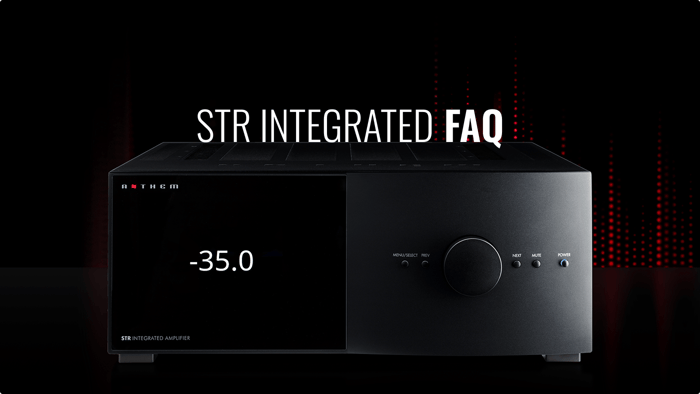

Curious about how to get the most from your Anthem STR Integrated Amplifier? Our Anthem STR Integrated FAQ section provides clear, expert answers to common questions about setup, connections, firmware updates, and Anthem Room Correction (ARC). Whether you’re connecting analog and digital sources, integrating a turntable or subwoofer, configuring Home Theatre Bypass (HT Bypass), or optimizing in-room performance with ARC, these answers are designed to help you unlock the full potential of your STR Integrated Amplifier in any listening environment.Table of Contents
- 1. Safety and General Handling
- 2. Setup, Connections, and Operation
- Q: How do I ensure proper speaker connections?
- Q: What formats do the digital inputs support?
- Q: Do I need drivers for the USB DAC input?
- Q: Why use Balanced XLR connections?
- Q: How do I connect a turntable and avoid hum?
- Q: What does Home Theatre Bypass (HT Bypass) do?
- Q: Can I connect my STR Preamp/Integrated to the network wirelessly? Does this allow for streaming?
- Q: Can I connect another preamplifier or receiver through my STR to still use my speakers?
- Q: Can I bypass the internal DAC of the STR Integrated Amplifier?
- Q: Does the unit truly turn off?
- 3. Anthem Room Correction (ARC™) & Sound Quality
- 4. Firmware and Software Updates
- 5. Service, Support, and Warranty
1. Safety and General Handling
Q: Can I service any parts inside the STR Integrated Amplifier myself?
No. There are no user-serviceable parts inside. To reduce the risk of electric shock, do not remove the cover or back. All servicing should be referred to qualified service personnel.
What do the lightning flash and exclamation point symbols mean?
Lightning flash: Warns of uninsulated “dangerous voltage” inside the unit that could cause electric shock.
Exclamation point: Alerts to important operating or maintenance instructions in the manual.
What are the key safety instructions for placement and environment?
Keep the unit away from water, rain, and moisture.
Do not place objects filled with liquids (e.g., vases) on the unit.
Avoid direct sunlight, heat sources, vibration, dust, moisture, and cold.
Ensure adequate ventilation; do not block openings or cover the unit with items such as a newspaper or tablecloth.
Place near an AC outlet for easy access to the power plug.
The top surface may become hot.
Q: Can I replace the fuse myself?
Only replace with the same amperage and voltage type. Refer replacement to qualified service personnel.
Q: Why does the power plug have a wide blade or grounding prong?
A: These are safety features. Do not defeat the purpose of a polarized or grounding-type plug.
2. Setup, Connections, and Operation
Q: How do I ensure proper speaker connections?
Disconnect power before connecting. Match red (+) speaker to red (+) amplifier, black (–) to black (–). Use cables rated for the amplifier output. Do not overtighten binding posts.
Q: What formats do the digital inputs support?
AES/EBU, coaxial, optical: PCM stereo up to 24-bit / 192 kHz.
USB DAC: Stereo PCM up to 32-bit / 384 kHz and DSD up to 5.6 MHz.
Q: Do I need drivers for the USB DAC input?
Windows PC: Install XMOS driver from Anthem website.
Mac OS: Plug-and-play (OS 10.6.4 or higher supports USB Audio Class 2.0).
Q: Why use Balanced XLR connections?
Balanced XLR offers the highest analog transmission quality and rejects noise/hum, especially over long cables.
Q: How do I connect a turntable and avoid hum?
Use the correct input for your cartridge (MM or MC) and connect the ground wire to the terminal next to the phono inputs.
Q: What does Home Theatre Bypass (HT Bypass) do?
HT Bypass lets the STR act as a 2-channel amplifier alongside a home theatre processor, bypassing digital processing and volume control. Only Left/Right channels are active; subwoofers connected only to the STR will be inactive.
Q: Can I connect my STR Preamp/Integrated to the network wirelessly? Does this allow for streaming?
No. STR models do not have Wi-Fi capabilities and do not support internal music streaming.
Q: Can I connect another preamplifier or receiver through my STR to still use my speakers?
Yes. Both the STR Pre and Integrated feature Home Theater Bypass, which allows a specific input to remain active even when the STR is powered off, passing the signal through to your speakers.
On the STR Integrated, you can use its internal amplifier to drive the speakers.
On the STR Preamp, an external amplifier is still required to power the speakers.
Q: Can I bypass the internal DAC of the STR Integrated Amplifier?
Yes. The STR allows you to disable Analog-to-Digital conversion for analog purists who wish to bypass digitizing the analog signal. Doing so removes all digital processing, including ARC Genesis, bass management, and other digital adjustments.
If the analog signal is converted to digital, it is processed internally at 32-bit / 192 kHz.
Q: Does the unit truly turn off?
No. The unit enters standby mode, consuming a very small amount of power.
3. Anthem Room Correction (ARC™) & Sound Quality
Q: What is the purpose of ARC?
ARC measures speaker output relative to the room and adjusts to optimize in-room response, compensating for resonance and coloration caused by walls, floors, and ceilings.
Q: Why doesn’t ARC flatten the bass completely?
ARC preserves room gain, which reinforces low frequencies naturally. Flattening this would make bass sound thin.
Q: Should I adjust subwoofer controls before ARC?
Yes. Set frequency to highest, contour to flat, and phase to 0.
Q: How should the microphone be positioned during ARC measurement?
Point microphone straight up.
Microphone, listener’s ears, and speaker centers should be at roughly the same height.
First position: central seating position; others ≥2 ft / 60 cm apart.
Use 5 positions minimum, up to 10 for larger rooms.
Q: Can ARC force speakers to play lower than designed?
No. ARC is not a substitute for proper speaker placement and cannot override the natural rolloff of your speakers. Attempting this can cause woofer or crossover damage.
4. Firmware and Software Updates
Q: How do I update firmware?
Updates are supported via network connection or mini-USB through ARC software. Options:
Automatic network update: STR searches online for the latest firmware.
Manual update: Download the .upd file from Anthem’s website and select it in ARC software.
Q: Where can I get the latest firmware?
https://www.anthemav.com/support/latest-software.php
Download, extract, and use via ARC software.
Q: What should I do during an update?
Installation takes <10 minutes. Do not press buttons or power off; the unit will reboot automatically.
5. Service, Support, and Warranty
Q: What is the warranty period?
5 years in Canada and the USA.
Q: How do I obtain service?
Contact your Authorized Anthem Dealer first. If factory service is needed, get a Return Authorization (RA) number from Anthem Technical Support.
Q: What must I include when shipping for service?
Prepaid shipping and insurance.
Original carton and packing.
Written description of the defect.
Copy of sales invoice.
RA number visible on the package.
Q: When is the warranty void?
Serial number is removed or altered.
Product is mishandled or improperly installed.
Product is tampered with, modified, or damaged by accident, transport, or power failure.
Product repaired by non-authorized personnel.
Q: How should I dispose of the unit at end of life?
Do not dispose with household waste. Return to a collection point for electronics recycling (WEEE directive in Europe).