
Curious about how to get the most from your Anthem STR Power Amplifier? Our Anthem STR Amplifier FAQ section provides clear, expert answers to common questions about power requirements, connections, operating modes, protection circuits, and firmware updates. Whether you’re choosing between XLR and RCA inputs, integrating the amp into a two-channel or home theater system, setting up triggers and auto-on behavior, or understanding temperature and fault indicators, these answers are designed to help you drive your speakers confidently and safely while unlocking the full performance of your STR Power Amplifier.Table of Contents
- I. Power and Connections
- II. Operation and Power Modes
- III. Setup and Display
- IV. Troubleshooting and Faults
- Q: How do I view operational status and fault messages?
- Q: What does a “Thermal” fault indicate, and how is it cleared?
- Q: If a “Load” fault appears, what should I do?
- Q: What should I do if a “DC” fault or “High Frequency” fault is indicated?
- Q: What if the internal temperature climbs significantly while playing bass-heavy music loudly?
I. Power and Connections
Q: What are the voltage requirements for the STR Power Amplifier?
The STR Power Amplifier is not an auto-voltage device. It must only be connected to the specified AC mains:
120 V, 60 Hz
240 V, 50/60 Hz
Always ensure the voltage rating on the rear panel matches your AC outlet.
Q: What is the recommended method for making input connections?
For best performance:
Use balanced XLR inputs whenever possible. These provide the highest transmission quality and superior rejection of noise and hum, especially over long cable runs.
If your preamplifier does not have balanced outputs, use the unbalanced RCA inputs instead.
Q: Are there any specific warnings regarding speaker connections?
Yes, observe the following:
Always ensure the amplifier is powered off when connecting or disconnecting speakers or inputs. The output voltage can be high enough to cause electric shock, depending on the signal level.
Connect the red (+) terminal on the speaker to the red (+) binding post on the amplifier, and the black (–) to the black (–) binding post.
Do not overtighten the binding posts—excessive force can cause mechanical damage.
Q: If I need to replace a fuse, what is the proper procedure?
For safety and continued protection:
Fuse replacement should be performed by qualified service personnel only.
Replace the fuse only with one of the same type, amperage, and voltage rating.
If you are unsure, consult a competent electrician or your Anthem dealer.
II. Operation and Power Modes
Q: How many ways can the STR Power Amplifier be turned on or off?
The STR Power Amplifier supports four power control methods:
Manual: Using the front panel Power button.
Signal Sensing (Auto On): The amplifier turns on when an audio signal is detected at the input, and turns off 20 minutes after the signal stops.
Trigger Control: Another device with a 12V trigger output turns the amplifier on/off.
Trigger + Signal Sensing: Both modes active at the same time.
Q: What happens if both trigger and audio signal detection are active?
If both rear panel switches are set to “Yes”:
When the amplifier is off, either a valid audio signal or an active trigger signal will turn it on.
While the amplifier is on, it will turn off when the trigger signal goes from on to off.
If no trigger is connected, the amplifier will instead turn off 20 minutes after no audio signal is detected.
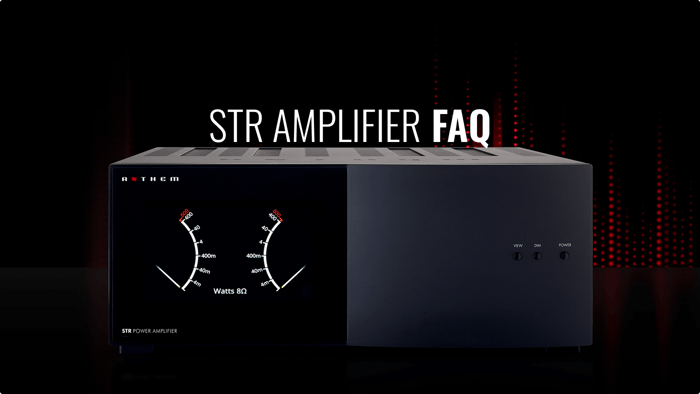
Q: What does the power meter display, and what should I do if the needle hits the top/red zone?
The power meter shows instantaneous signal peaks, with peak-hold indicators that briefly retain the highest recent value.
If the needle enters the red zone, it indicates very high output power. You should reduce the volume to avoid driving the amplifier and speakers beyond safe limits.
Q: Is it normal to hear a click when powering the unit on or off?
Yes. A mechanical click from the relays during power-on or power-off is normal and indicates internal protection and switching circuits are operating as intended.
III. Setup and Display
Q: How do I access the STR Power Amplifier’s setup options?
To access the setup screens:
Press VIEW on the front panel.
Then press DIM to cycle into the Setup options.
From there, you can adjust display, meter, and operating preferences.
Q: If I change the “Speaker Impedance for Meter Display,” does it affect amplifier performance?
No. The Speaker Impedance for Meter Display setting (2, 4, or 8 ohms):
Is used only to calibrate the power meter scale for more accurate indication.
Does not change the actual power output, load capability, or audio performance of the amplifier.
Select the value that best matches your speakers’ nominal impedance.
Q: Can I monitor the amplifier’s internal temperature?
Yes. Under the Power Screen Info setting, you can choose:
Power Only, or
Power + Temperature
When Power + Temperature is selected, internal temperature readings are shown at the lower left and right of the display. Minor differences between channel readings are normal. You can also select Celsius or Fahrenheit as the temperature unit.
Q: How do I update the firmware?
Firmware controls operational behavior and display functions. To update:
Download the appropriate .zip file for the STR Power Amplifier from anthemav.com.
Save and unzip the file, then copy the STRAMP folder onto a USB stick.
The STRAMP folder must contain both files:
current
STRAMP xxxx.upd
With the amplifier powered on, insert the USB stick into the rear panel USB port.
Follow the on-screen instructions on the front panel display.
The update is complete when the unit powers itself back on and the power meter is displayed.
Do not remove power or the USB stick while the update is in progress.
IV. Troubleshooting and Faults
Think of the STR Power Amplifier’s monitoring and fault detection like a ship’s instrument panel: “Thermal” is your engine temperature gauge, “Load” is your wiring and connections, and “DC/High Frequency” are deep system checks. When the panel warns you, it’s telling you where to look—either at the wiring around the ship, or at the engine itself—so you can correct the issue before damage occurs.
Q: How do I view operational status and fault messages?
Press VIEW to access the Device Information screen. This screen shows:
Rear panel switch positions
Firmware version
Various operating conditions
If a fault occurs, a fault message will also appear automatically at the bottom of the power meter display.
Q: What does a “Thermal” fault indicate, and how is it cleared?
A Thermal fault means the amplifier has reached an over-temperature condition.
The amplifier will shut down to protect itself.
Allow it time to cool down, and ensure there is adequate ventilation around the unit.
Once the temperature drops to a safe level, output will resume or the unit can be powered back on.
This may take several minutes depending on room temperature and airflow.
Q: If a “Load” fault appears, what should I do?
A Load fault usually indicates a short or improper connection on the speaker outputs:
Turn off the amplifier (or at least the audio source).
Inspect all speaker cables:
Ensure + and – conductors are not touching each other.
Ensure they are not touching the chassis or any other conductive metal.
Correct any wiring issues.
After the fault condition is removed, the amplifier should recover automatically.
If the fault persists even after disconnecting all speaker cables and power cycling the unit, the amplifier may require service.
Q: What should I do if a “DC” fault or “High Frequency” fault is indicated?
In either case, determine whether the fault originates within the amplifier or from external equipment:
Turn the power off and disconnect the power cord.
Disconnect all input and speaker cables from the rear panel.
Reconnect only the power cord and turn the amplifier back on.
If the fault indication remains with no connections, the amplifier likely requires repair—contact your Anthem dealer or Anthem Technical Support.
A High Frequency fault is extremely unlikely during normal music playback and is more typically caused by improper use of ultrasonic signals from test equipment.
Q: What if the internal temperature climbs significantly while playing bass-heavy music loudly?
This is expected and normal. High sustained output, particularly with bass-heavy content, generates significant heat:
The amplifier is designed with protection circuits that will shut it down in the event of an over-temperature condition.
If this happens frequently, consider improving ventilation or reducing sustained high-level playback.
We’re continually improving and expanding our FAQ content to provide the most helpful and up-to-date guidance for your Anthem products. If you don’t find the answer to your question here, please contact your authorized Anthem dealer or reach out to Anthem Technical Support for personalized assistance.